A free alternative to Soundpad and Voicemod
Soundpad is a paid app, and Voicemod keeps much of what it does behind a subscription. Onion Board does the same core job, playing sounds through your mic into Discord and games, and it's free: no account, no ads, no trial.
⬇ Download Onion Board (free)Windows 10 and 11 · full source code on GitHub
What you get for free
| Feature | Onion Board |
|---|---|
| Play sounds through your mic into Discord and games | Yes |
| Global hotkeys that work in fullscreen games | Yes |
| In-game overlay with your pads | Yes |
| Unlimited sounds, any length | Yes |
| Live voice changer (robot, radio, echo, pitch…) | Yes |
| Text-to-speech into voice chat, in 33 languages | Yes |
| AI voices: 12 characters or your own blend, live, on your own PC (optional add-on) | Yes |
| Record a sound with your mic, or from whatever is playing | Yes |
| Switches to a game's sounds by itself when the game is in front | Yes |
| Warns you when a Discord setting would cut your sounds out | Yes |
| The whole app in 32 languages | Yes |
| Effects per sound: trim, speed, pitch, bass boost, reverb, Nightcore | Yes |
| Add sounds from YouTube and SoundCloud search | Yes |
| Instant replay: turn the last 30 seconds of a call into a pad | Yes |
| MIDI pad controllers (Akai, Launchpad) as hotkeys | Yes |
| Screen triggers: play a sound when something appears in your game | Yes |
| Stream Deck / Touch Portal / AutoHotkey control | Yes |
| One hotkey plays a random sound from a category | Yes |
| Hotkeys to switch category in-game, and a set of hotkeys per category | Yes |
| Queue sounds, play a category in order or shuffled | Yes |
| Per sound: hold to play, fade in / out, wait first, cooldown, only others hear it | Yes |
| Hotkeys for your mic, the voice changer (or only while held) and all hotkeys off | Yes |
| Clean stream output for OBS (sounds and voice as their own track) | Yes |
| Send one program's sound (music, a video) to the call, and clip bits of it into pads | Yes |
| Your pads on your phone, no app to install | Yes |
| Your own local text-to-speech voices (Kokoro, AllTalk, Piper) | Yes |
| Bring your board over from Soundpad, Resanance, Soundux or EXP Soundboard in one click | Yes |
| Price | Free |
The thing the others don't do: screen triggers
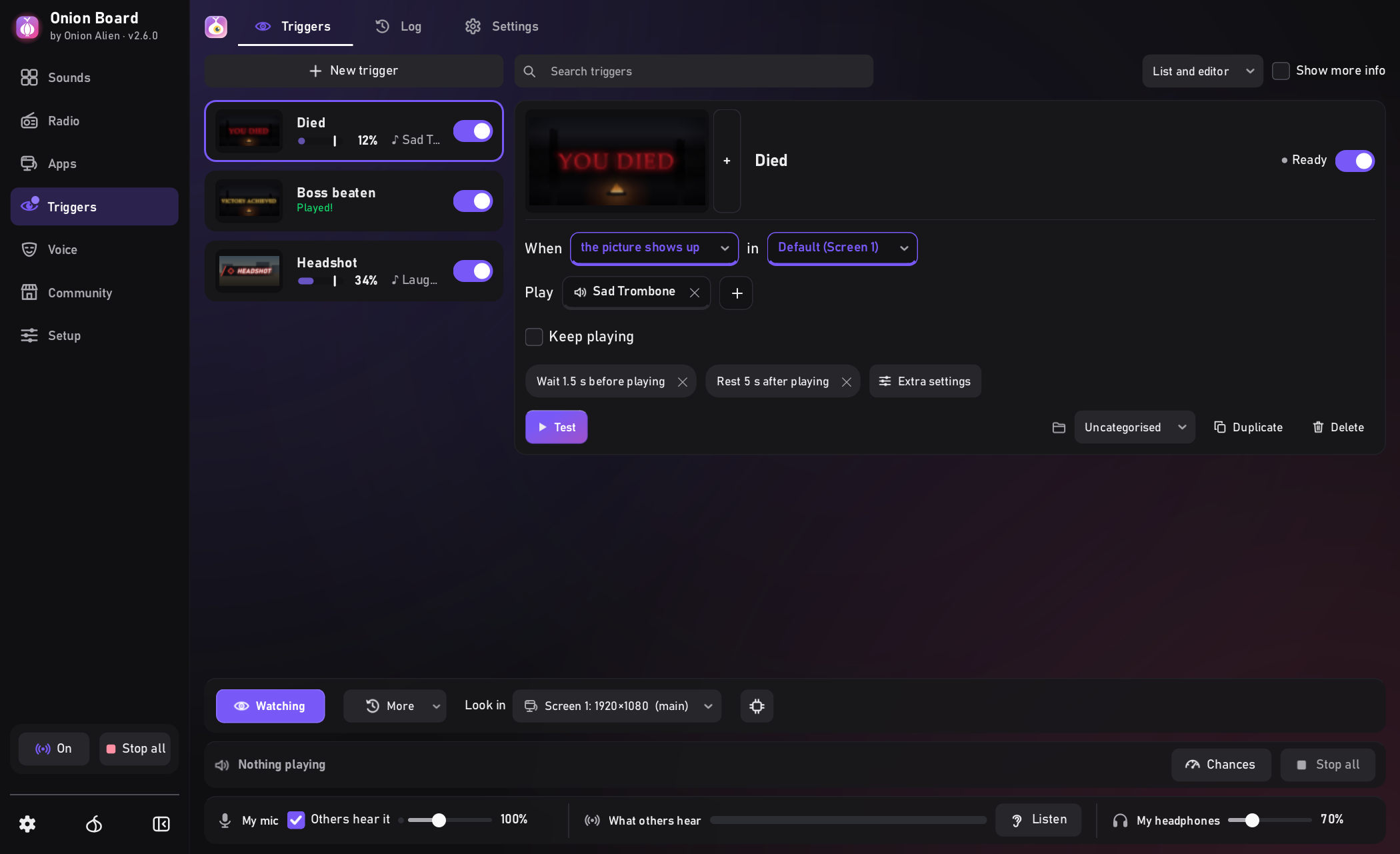
Give Onion Board a picture from your screen, like a game's "YOU DIED" text, a victory banner or a kill icon, and it plays a sound the moment that picture shows up. Set a sad trombone for every death and never press a key. It watches the game's own window, works behind other windows, and runs entirely on your PC.
Switching over
- Install Onion Board. Like Soundpad, it puts your sounds straight into your mic, so there's no virtual cable to install (or pick another output to send to, like Voicemeeter). If Soundpad, Resanance, Soundux or EXP Soundboard is on your PC, it offers to bring your sounds over, with their names, categories and hotkeys. Your old app keeps its own copy.
- Coming from somewhere else? Drag your sound files or folder onto the window. Most audio and video formats work. (Voicemod keeps your own sounds in your online account, so add the files you first gave it.)
- Nothing to change in Discord or your game: they keep your normal mic. In Discord, set Input Profile to Custom and Noise Suppression to None so it doesn't filter your sounds out. Onion Board tells you if a Discord setting is in the way.
- Right-click pads to give them hotkeys (the ones you brought over already have theirs).
Full setup with screenshots: how to play sounds through your mic in Discord.
Already installed? Backup → Import from another soundboard does the same any time.